

10 Ways to Get More Actionable Insights from Your Conversation Analytics Platform
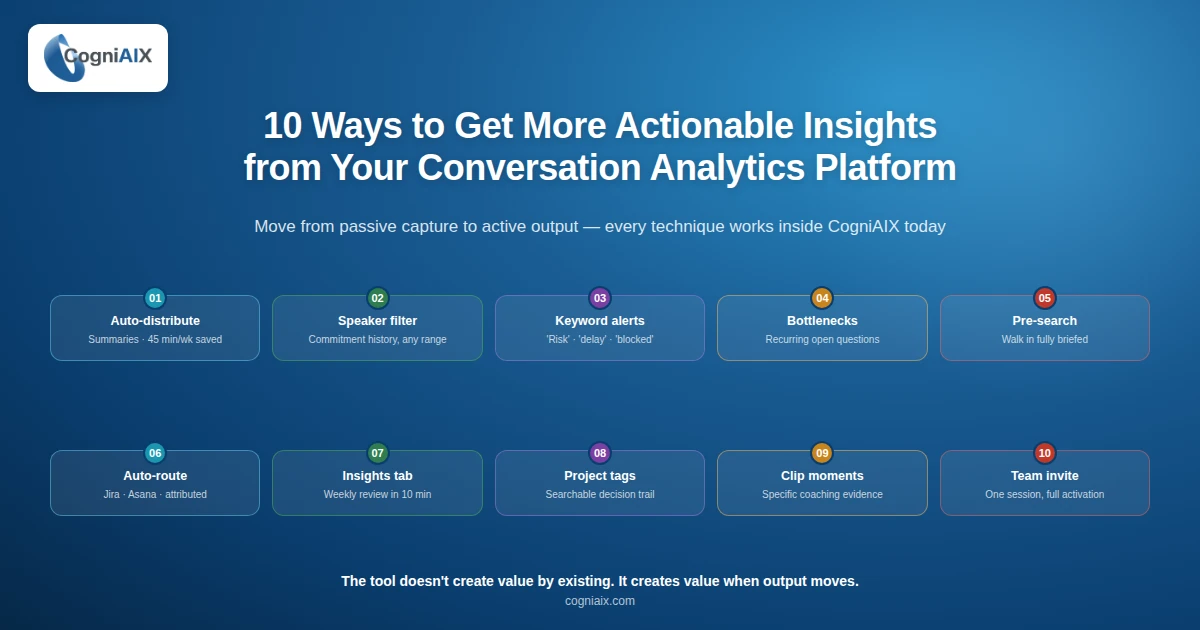
This conversation analytics platform guide shows you 10 ways to turn meetings into tracked work. In short, most teams use a CI tool to capture calls. However, they stop at transcription. So, the action item from Tuesday sits open. The objection pattern nobody tracked surfaces again on Friday. Luckily, this guide fixes that gap and helps your team save hours every week.
In fact, the numbers tell the story:
- First, knowledge workers spend about 21.5 hours a week in meetings, per Microsoft's Work Trend Index.
- Second, more than 67% of meeting action items never get done, per Harvard Business Review.
- Third, only 3% of business calls get any review, McKinsey reports.
- Also, sales teams using CI tools report a 48.1% lift in close rates, based on internal CogniAIX data and Atlassian's State of Teams research.
- Finally, top teams save 45 minutes per person per week on after-call admin by following the techniques below.
"The platform does not create value by existing. In addition, it creates value when output moves."
In contrast, this conversation analytics platform guide shows you how to use conversation intelligence the way it was built to be used. Not as a note-taking tool. Rather, as the bridge between what your team discusses and what your team actually delivers. Indeed, every technique here works inside CogniAIX today.
Why This Conversation Analytics Platform Guide Matters
Above all, the gap between recording a call and acting on it is where most teams lose value. In fact, the meeting is captured. The summary arrives. And then nothing changes. However, that is exactly the failure mode this conversation analytics platform guide is built to close.
So, the 10 techniques below move you from passive capture to active output. Indeed, your team saves time, stops chasing context, and ships work faster. In fact, here are the groups you will work through:
- First, auto-routing and routing techniques
- Second, archive and search techniques
- Third, coaching and team-wide rollout techniques
The 10 Techniques for Conversation Analytics Platform Guide
01. Turn on auto-routing before your next meeting
First, most users review the summary by hand and forward it themselves. However, skip that step fully. Instead, set up CogniAIX to send structured summaries to all speakers and to your Slack channel the moment the session ends. Indeed, the output reaches the right people before anyone opens their email. So, your team gains 45 minutes per week back.
02. Filter the archive by speaker to surface commitment history
Thus, open the archive and filter by speaker name. In fact, CogniAIX pulls every promise that person made across any date range. In fact, 7 days, 30 days, or a full quarter. Indeed, you get ownership without opening a single recording.
03. Set keyword alerts for the signals you cannot afford to miss
Hence, make alerts for terms your meetings produce often. For example, "risk," "delay," "rival," "blocked," and "escalate." In fact, CogniAIX flags every instance across all captured sessions. So, you stop chasing context across call recordings. Indeed, you start seeing patterns across your entire library.
04. Identify your team's decision bottlenecks before they become missed deadlines
Still, open the Insights tab and look at recurring open questions. In fact, items that appear in meetings after the meeting without a fix. In fact, these are your choice bottlenecks. So, CogniAIX surfaces them across the archive. Notably, you can see which topics stall your team most often. Indeed, you intervene before a delay becomes a missed promise.
05. Search the archive before every follow-up meeting
Meanwhile, before any client call or client review, search the CogniAIX archive by company, contact, or project name. In fact, every previous call surfaces in one place. In fact, choices made, promises given, and open questions remain. So, you walk in with the full history. No prep email needed. No chasing notes across three tools.
06. Route action items to your project tool at the point of capture
Indeed, link CogniAIX to Jira or Asana and set up routing rules by keyword or speaker. In fact, the moment CogniAIX detects "I will handle the spec by Thursday," a Jira ticket appears with the owner pre-assigned. So, the call ends and the work begins on its own. Indeed, your team never copy-pastes from a summary again.
07. Use the Insights tab for your weekly team review
Likewise, instead of reviewing each call each week, open the Insights tab and read across the whole team. In fact, you see objection frequency, choice pace, and open question volume. So, ten minutes of review gives you a clearer picture than four hours of call replays. As a result, your review time drops sharply.
08. Apply project tags after the fact to build a searchable decision trail
Notably, tag past meetings by project, client, or project from inside the archive. In fact, every choice linked to that project becomes searchable by name. As a result, when a decision is questioned weeks later, the answer takes ten seconds to find. So, your team gains a real company-wide memory.
09. Share specific moments from calls
Plus, find a moment in any transcript. For example, a strong objection handle, a clean close, or a missed buying signal. Then clip that timestamp. In fact, you can share it directly from CogniAIX to one person or a group. So, coaching becomes specific, fast, and rooted in what actually happened.
10. Invite your team and set up shared setups in a single session
Notably, add all team members from the admin panel and assign roles. Then set up shared tools like Slack, Jira, Teams, and Google Docs. In fact, do this once for the whole org. As a result, every meeting your team runs from that point forward produces structured, routed, searchable output for everyone.
Quick Reference: Technique by Outcome
So, here is the conversation analytics platform guide at a glance:
| If you want to... | Use technique # | Time to set up |
|---|---|---|
| Stop writing post-meeting summaries | 1 | 2 minutes |
| Track a specific person's commitments | 2 | Under 1 minute |
| Spot where decisions are getting stuck | 4 | No setup, use Insights tab |
| Walk into follow-ups fully briefed | 5 | 2 minutes per meeting |
| Eliminate manual task creation | 6 | 5 minutes |
| Run a smarter weekly team review | 7 | No setup |
| Make past decisions instantly searchable | 8 | Tag as you go |
| Deliver evidence-based coaching | 9 | No setup |
| Activate the full platform for your team | 10 | 10 minutes |
How These Techniques Stack Up
As a result, here is how the 10 techniques compare on time-to-value and team impact:
| Technique | Time to first result | Team impact |
|---|---|---|
| Auto-distribute summaries | First meeting | Everyone saves admin time |
| Speaker-based archive filter | Same day | Managers track promises easily |
| Keyword alerts | First week | Surface risks before they grow |
| Bottleneck spotting | First sprint | Unblock projects faster |
| Pre-meeting archive search | Per meeting | You walk in fully briefed |
| Auto-route to Jira or Asana | First call | Tasks flow on their own |
| Weekly Insights review | First week | 10x faster than replay |
| Retroactive project tags | First month | Decisions get retrievable |
| Clip moments for coaching | First coaching cycle | Reps improve faster |
| Team-wide invite | Same day | Full platform rollout |
People Also Ask: Conversation Analytics Platform Guide
What does a conversation analytics platform actually do?
Also, a conversation analytics platform guide always starts with the basics. In fact, the platform captures what gets said in meetings. Moreover, it spots who promised what. Then it structures the output into summaries, action items, and searchable records. In fact, CogniAIX goes further. So, it routes those outputs on its own to the tools your team already uses.
How is CogniAIX different from a transcription tool?
In fact, transcription tools convert speech to text and stop there. However, CogniAIX interprets what was said. So, it detects promises, tags ownership, spots decisions, and routes action items to the right people and tools on its own.
How do I show ROI from CogniAIX before getting full team buy-in?
So run CogniAIX across five meetings in your first week. Then track three numbers. First, time saved on post-meeting admin. Second, action item closing rate. Third, how often follow-ups require fix-up. In fact, most managers see enough evidence to approve full rollout after the first week.
Which technique should I start with?
So technique number 1 - turn on auto-routing. In fact, it takes two minutes. Also, it cuts the single biggest manual task most teams have after every meeting. As a result, you save 45 minutes per person per week from day one.
Does CogniAIX work for recorded meetings as well as live ones?
Indeed, yes. So upload any existing audio file directly to the dashboard. In fact, both MP3 and M4A files work. Therefore, processing runs at about one minute per ten minutes of audio. As a result, the output is identical to a live capture.
The Meeting Already Happened. The Work Should Already Be Moving.
So every conversation analytics platform guide eventually comes back to the same point. In fact, the tool does not create value by existing. Rather, it creates value when the output goes somewhere. In fact, into a task, into a project record, into a decision review, or into coaching.
Indeed, action-ready insights from conversations do not come from better AI alone. Rather, they come from knowing where to pull the lever and pulling it before the meeting fades from memory. Therefore, CogniAIX handles the capture, the structure, and the routing. So these 10 techniques make sure none of that goes to waste. For the cost angle — what unproductive meetings actually drain from your team — see conversation data analytics: the hidden price tag of every meeting that goes nowhere.
In fact, your team is already talking. Also, CogniAIX is already capturing. As a result, the gap between talk and output closes the moment you put what you just read into practice.
Try CogniAIX free - no credit card required. Indeed, you get full feature access from day one. Also, your first structured output lands in under 30 minutes. Above all, your team starts saving time today.