


Meet CogniAIX: How CogniAIX's AI Agent Turns Conversations into Tasks
Understanding CogniAIX AI agent how it works starts with the problem it fixes. So your team talks. Decisions get made. Commitments get said out loud. However, the meeting ends and most of that disappears into a chat thread, a half-filled CRM field, or nobody's task list. So you lose hours every week chasing context that should already be tracked.
In fact, the data backs this up:
- First, knowledge workers spend about 21.5 hours a week in meetings, per Microsoft's Work Trend Index.
- Second, more than 67% of meeting action items never get finished, per Harvard Business Review.
- Third, only 3% of business calls get any structured review, McKinsey reports.
- Also, top teams save 45 to 60 minutes per person, per week on post-meeting admin once CogniAIX takes over, based on internal data and Atlassian's State of Teams report.
So CogniAIX is CogniAIX's AI agent. Indeed, it captures every meeting. Furthermore, it pulls out every commitment. Above all, it routes structured work to the tools your team already uses — so you save time and never copy-paste tasks again.
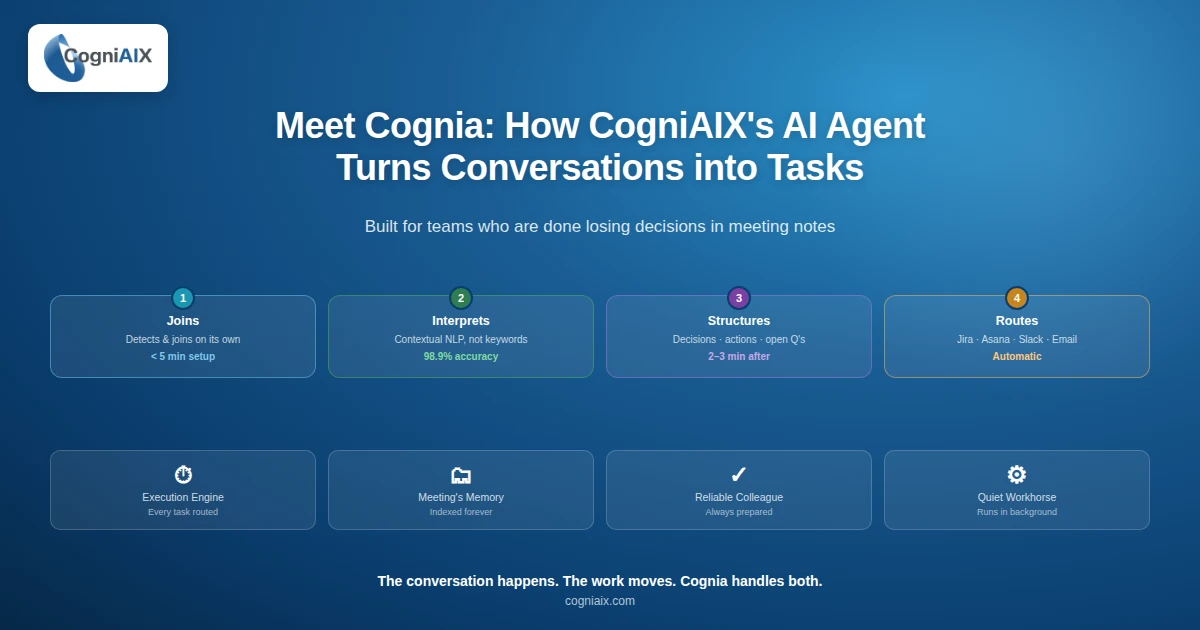
Built for teams who are done losing decisions in meeting notes.
So no summary to write. Also, no action items to chase. So whether you are setting up a CI platform or just exploring CogniAIX AI agent how it works, here is what CogniAIX does and how it fits your existing stack.
What CogniAIX Actually Does
In fact, most people expect an AI agent to be complex. However, CogniAIX is not. Indeed, it runs in the background, handles the manual work, and surfaces structured output without asking for your attention. So think of it as the reliable colleague who always has the notes ready before you ask.
In fact, CogniAIX plays four roles in every meeting:
- Execution Engine. First, it routes every task and tags every owner. So your team starts work the moment the call ends.
- Meeting's Memory. Second, it indexes every conversation, encrypted and searchable. So you never lose a decision again.
- Reliable Colleague. Third, it delivers structured summaries before the next meeting starts. Indeed, you always show up prepared.
- Quiet Workhorse. Finally, it runs in the background. So you save effort and never have to think about it.
Also, every one of these roles is active in every meeting. Indeed, CogniAIX automates the work, remembers the decisions, shows up prepared, and never asks for recognition.
Four Steps. Fully Automated.
Notably, CogniAIX AI agent how it works comes down to four clear steps. Each one removes manual effort:
Step 1: CogniAIX joins your meeting
So record audio or connect CogniAIX to your Teams, Slack, email, or Google Docs. Then CogniAIX detects your scheduled meetings and joins on its own. So you run the meeting exactly as you always have. Indeed, CogniAIX listens with speaker attribution at 98.9%+ accuracy.
Furthermore, setup time is under 5 minutes. So no developer required.
Step 2: CogniAIX interprets the conversation
In fact, this is where CogniAIX separates from basic transcription. Specifically, it does not match keywords. Instead, it reads context. So "I will send the updated brief by Thursday" becomes an action item, tagged to the person who said it, with a deadline attached. However, "Someone should look at that eventually" does not. So the distinction is everything.
Indeed, contextual NLP — not keyword matching, not templates — is what saves your team the cognitive effort of reading raw transcripts.
Step 3: CogniAIX structures the output
So within 2 to 3 minutes of the meeting ending, you get a structured summary in your inbox and your dashboard. In fact, it is split into decisions made, action items with owners, and open questions. Indeed, every item links to its timestamp in the transcript. So you can click any line to hear the exact moment it was said.
Also, the summary is ready before your next calendar appointment.
Step 4: CogniAIX routes work to your tools
Finally, action items flow into Jira, Asana, or Slack on its own. So the task appears in your project board. No copy-paste. No manual follow-up. Indeed, the conversation happened and the work is already moving in the systems your team uses.
Moreover, each integration takes under 5 minutes to set up.
CogniAIX AI Agent How It Works Inside Your Organisation
Specifically, here is the full picture of what happens from the moment a meeting ends:
| Stage | What CogniAIX Does | Time |
|---|---|---|
| During the meeting | Joins automatically, transcribes with speaker tags | Real-time |
| Right after | Reads context, pulls out decisions and actions | Instant |
| 2 to 3 minutes later | Structures and formats the summary | Automatic |
| Sending | Sends to email, Slack, and project tools | Automatic |
| Archive | Indexes full transcript, encrypted and searchable | Permanent |
In fact, nothing in that chain needs a human step after the initial setup. So CogniAIX automates the workflow end to end — no maintenance, no check-in, no prompting. So you reclaim hours every week.
For Power Users: What CogniAIX Remembers
Indeed, the searchable archive is where CogniAIX becomes essential for teams that run recurring projects. So every session CogniAIX captures is indexed and searchable from the moment it ends. In fact, you can search by:
- First, keyword or phrase across all transcripts
- Second, person name or team
- Third, date range or project tag
- Finally, action item status — open, completed, or overdue
So the question "what did we decide about the Q3 launch?" gives you an answer in seconds. Therefore, no replaying. Also, no chasing. Furthermore, CogniAIX remembers everything so your team does not have to. Indeed, this is the Meeting's Memory role in practice.
How CogniAIX Compares to Other Meeting Tools
Notably, here is how CogniAIX stacks up against the tools your team may already be using:
| Tool type | What it does | What it misses |
|---|---|---|
| Transcription service | Speech to text | No routing, no task creation |
| Meeting recorder | Stores audio and video | Output is a file, not structured work |
| AI note-taker | Writes a summary on request | Still needs human review and sending |
| CogniAIX | Captures, interprets, structures, routes | None — full automation end to end |
So if you want to know CogniAIX AI agent how it works versus simpler tools, the answer is automation depth. In fact, transcription stops at text. Therefore, CogniAIX keeps going — all the way to a task in Jira and a summary in Slack.
People Also Ask — CogniAIX AI Agent How It Works
Why do our meeting decisions keep getting lost?
So meetings end fast and notes often stay incomplete. However, CogniAIX fixes that — it captures decisions in real time and saves them in one place. Therefore, you never lose context again.
Will CogniAIX make me do extra admin work?
In fact, no. Indeed, it removes work instead of adding more. Specifically, it writes the summary, finds action items, and gets everything ready for you automatically. So you save time on every call.
How does CogniAIX know who should own each task?
So it listens to the conversation and reads context. Therefore, if someone says "I'll handle that by Thursday," CogniAIX treats it as a task with an owner and a deadline. As a result, you never assign tasks twice.
Does CogniAIX work with the tools we already use?
Indeed, yes. In fact, it connects to tools like Slack, email, and Google Docs. So your tasks move into your workflow without manual steps.
What if I need to check an old decision later?
So you can search the archive anytime. Furthermore, CogniAIX keeps meetings searchable. Therefore, you find the right note, quote, or action item without replaying the call.
One Meeting Shows CogniAIX AI Agent How It Works
In fact, most teams that try CogniAIX through a trial make the rollout decision after three meetings — not because the product pitches well, but because the output is visible right. Specifically, the summary lands. Then the action items appear in Jira. Indeed, the meeting happened and the work moved.
So that is CogniAIX AI agent how it works. Not a transcript. Not a recording. Rather, outcomes — structured, routed, and ready to act on before your next call starts.
Therefore, no replaying. Also, no chasing. Above all, no guesswork.
So CogniAIX is free to try, full-featured from day one, and ready to connect to your existing stack in under 30 minutes.
Try CogniAIX free — no credit card required. Indeed, you get full feature access from day one. Also, your first structured summary lands in under 30 minutes. Above all, your team starts saving time today.