

How to Build an AI-Powered Meeting Workflow Your Whole Team Will Actually Use
An AI conversation analysis tool turns spoken meetings into tracked work. However, most teams do not have a meeting problem at all. Instead, they have an action gap — the space between what gets said and what gets done. Therefore, the right AI conversation analysis tool closes that gap fast. As a result, your team saves hours every week and ships work faster.
In fact, the numbers tell the story:
- First, knowledge workers spend about 21.5 hours a week in meetings, per Microsoft's Work Trend Index.
- Second, more than 67% of meeting action items are never finished, per Harvard Business Review.
- Third, only 3% of business calls get any structured review, McKinsey reports.
- Also, top teams cut post-meeting admin time by 45 to 60 minutes per person, per week, based on CogniAIX internal data and Atlassian's State of Teams research.
- Finally, 80% adoption is reachable in under a month when teams expand by meeting type, not headcount.
"An AI conversation analysis tool is not a transcription service. Transcription captures words. Conversation intelligence captures meaning, commitment, and accountability — and routes them where they need to go."
However, picking the tool is the easy part. Indeed, getting your whole team to use it, integrate it, and trust the output — that is the work this guide addresses. Therefore, whether you are a Product Manager, an Ops Lead, or an IT decision lead, this framework covers the full adoption arc.
The Problem Is Not Meetings — It Is What Happens After Them
So your team talks. Your team decides. However, somewhere between the end of the call and the start of the next one, the clarity dissolves.
Indeed, follow-up emails twist decisions. Also, CRM records get updated from memory. Also, action items that were clearly assigned on the call sit in a notes document nobody reads. As a result, three days later, the same questions resurface.
So this is the talk-versus-action gap. In fact, it is structural, not behavioral. Therefore, adding another note-taking tool does not fix it. Likewise, asking reps to fill in more CRM fields does not fix it either.
In short, what fixes it is a system that catches what was decided, who owns what, and what happens next — on its own. Therefore, your team gains hours back and stops chasing context across tools.
Why AI Meeting Tools Fail at the Team Level
Indeed, solo AI tools get adopted. However, team-wide AI workflows often stall. Here is why most rollouts break:
| Failure mode | What it looks like | Why it happens |
|---|---|---|
| Tool becomes optional | Some reps use it, others do not | No clear output standard set |
| Output not actionable | Transcripts delivered, nothing routes | No link to stack |
| Trust breaks down | Team ignores AI summaries | Accuracy or output issues |
| Adoption treated as IT | Rollout handed to IT, users not consulted | Workflow fit not validated |
| ROI invisible to leadership | Tool used, value not measured | No adoption metrics tracked |
So each failure has a fix. Therefore, the AI conversation analysis tool your team will actually use is one where the output reduces work rather than creates it. Also, the workflow was designed with the team, not imposed on them.
How CogniAIX Functions in a Team Workflow
In short, CogniAIX plays four distinct roles in an AI-powered meeting workflow. Notably, each one addresses a failure point teams hit when meetings generate talk but not action:
- Execution Engine. First, it detects commitments, assigns ownership, and routes action items to Jira or Asana on its own. So your team ends the meeting with work already assigned. No manual ticket creation. No post-call CRM entry.
- Meeting's Memory. Second, it indexes every conversation, encrypted and searchable from the moment the session ends. Therefore, "what did we decide in the March product review?" gives you an answer in seconds, not a Slack thread.
- Reliable Colleague. Third, it delivers structured summaries before the next meeting starts. Indeed, decisions, actions, and open questions arrive separated and distributed — without a human writing them.
- Quiet Workhorse. Finally, it runs in the background. As a result, no interface to check, no workflow to switch into. The AI conversation analysis tool captures, interprets, and distributes. Also, the output surfaces in the tools your team already uses.
Where an AI Conversation Analysis Tool Fits in Your Stack
So the most common question from Ops Leads: where does this sit relative to what we already have? Here is how CogniAIX maps to your stack:
| Layer | Existing tool | CogniAIX relationship | Net effect |
|---|---|---|---|
| Meeting platform | Zoom, Teams, Meet | Integrates and captures | No change to meeting behaviour |
| Project management | Jira, Asana | Creates tasks from commitments | No post-meeting ticket creation |
| Communication | Slack, email | Distributes digests and summaries | Team informed without a separate step |
| Knowledge base | Notion, Confluence | Archive feeds search layer | Meeting decisions become searchable docs |
| Transcription tool | Otter, Rev | Replaces this layer entirely | Structured output instead of raw text |
In fact, CogniAIX does not compete with your CRM, your PM tool, or your chat platform. Rather, it sits one layer upstream of the conversation and feeds structured data into everything downstream.
Also, for Ops Leads worried about stack complexity, this is one tool replacing many, not another tool to add. Indeed, the AI meeting notes tool question — "do we need this if we already have X?" — is answered by asking what X actually receives. So if X receives data typed in by hand from someone's memory of a meeting, CogniAIX improves the accuracy of X, not the count of tools in your stack.
The Adoption Model That Reaches 80%
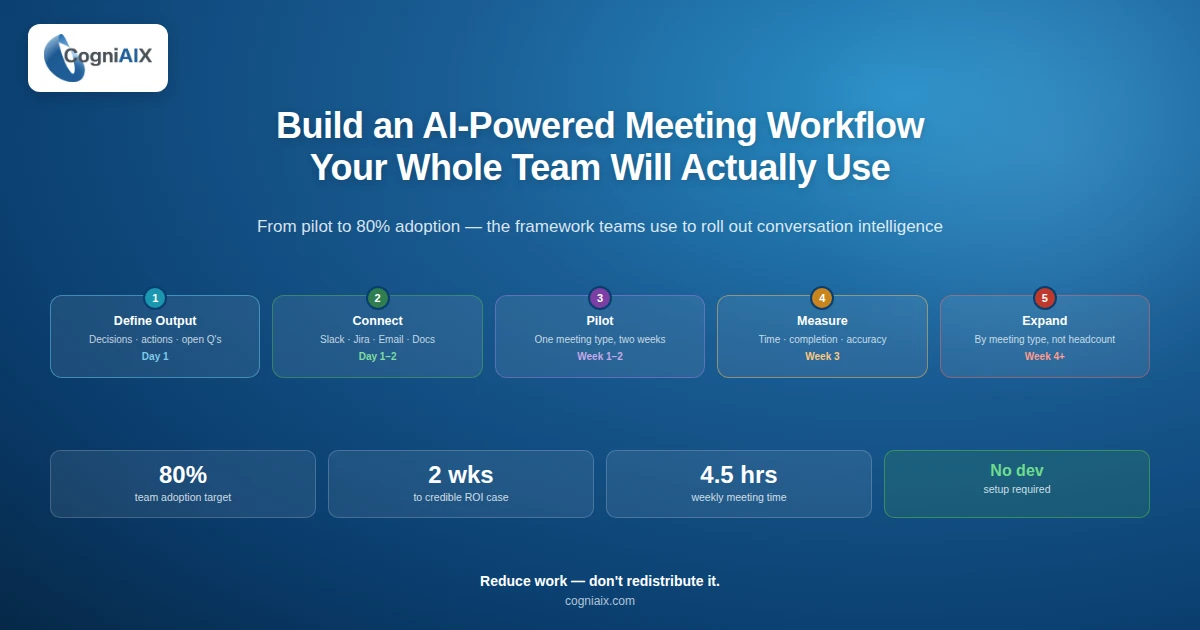
Indeed, tech-forward teams that well deploy an AI conversation analysis tool at scale follow a consistent pattern. Here is the five-step framework in order:
- Define the output standard (Day 1). First, agree what every meeting must produce — decisions, actions, open questions — structured and routed.
- Connect your tools (Day 1 to 2). Next, link CogniAIX to Slack, email, and Google Docs. Point-and-click setup, no developer required.
- Pilot one meeting type (Week 1 to 2). Then, run one high-frequency meeting type for two weeks. Validate output quality and workflow fit.
- Measure and make the ROI case (Week 3). After that, track time saved on admin, action item completion rate, and CRM accuracy. Present numbers to leadership.
- Expand by meeting type (Week 4+). Finally, roll out meeting type by meeting type — not by team. So the output standard stays consistent.
So teams that reach 80% adoption do not roll out the tool to everyone at once. Rather, they expand by meeting type, not by headcount. As a result, the output standard stays consistent and the workflow changes stay visible.
Building the ROI Case for Leadership
So if you need to justify this to a VP or finance lead before full rollout, your pilot generates the numbers. Here is the data structure to track:
| Input | Benchmark | Source |
|---|---|---|
| Time spent in meetings per worker | 4.5 hours per week | Microsoft Work Index |
| Post-meeting admin time per meeting | 45 to 60 minutes per week | Team audit during pilot |
| Improvement in call-to-close rate (sales) | Up to +48.1% | Industry research |
| Reduction in new hire ramp time | Around -35% | Structured onboarding |
| Action item completion rate improvement | Measurable in week one | Pilot output data |
In fact, the pilot produces real numbers from your team, in your context. So those numbers — not vendor claims — make the leadership case. Indeed, two weeks of one meeting type is enough to build a strong business case for full deployment.
You do not need a consultant to build the ROI case. You need two weeks of pilot data and a spreadsheet. CogniAIX generates the data. You present the numbers.
People Also Ask — AI Conversation Analysis Tool
Why do meetings still create so much follow-up work?
So the meeting itself is not the problem. Rather, the gap starts after the call ends. However, an AI conversation analysis tool closes that gap. Notably, it catches what was decided, who owns it, and what happens next.
Do we really need this if we already take notes?
Indeed, yes — because notes often live in a doc that no one checks again. However, a good AI conversation analysis tool turns the conversation into tasks, summaries, and searchable records. As a result, your team can actually use them.
What is the easiest way to roll this out to my team?
First, do not launch it everywhere at once. Instead, pick one high-frequency meeting, connect your main tools, and run a small pilot first. Therefore, rollout gets easier.
Will this add another tool to our stack?
In short, not really. Rather, it works upstream of your current tools and feeds clean data into them. So your stack gets better instead of more crowded.
How can I show the business value fast?
So use two weeks of pilot data. Notably, measure time saved, task completion, and follow-up accuracy. Indeed, when you show real numbers from your own team, it becomes much easier to win support from leadership.
Your Team Will Use What Works Without Extra Effort
Indeed, the teams that well adopt an AI conversation analysis tool share one trait. Notably, they chose a platform that reduced work rather than shifted it.
In fact, CogniAIX captures what was said. Then it extracts what matters. Also, it routes the output where it needs to go. As a result, your team does not change how they meet — they change what exists after the meeting ends.
So start with one meeting type. Connect your tools. Review the first week of output. Indeed, the conversation intelligence platform your team will actually use is the one that makes the gap between talk and action vanish on its own. Above all, your team will not have to think about it.
Try CogniAIX free — no credit card required. Indeed, you get full feature access from day one. Also, your first structured output lands before your next call ends. Above all, your team can start today.